
Sections (Tag groups)
x-tagGroups is a vendor-specific property that helps to define custom sections in the navigation part of your documentation. Instead of the default “Endpoints” or “Webhooks” sections (for REST APIs) or “Channels” (for Message Driven APIs), you can create your own set of sections which will contain the tagged operations of your choice.
Use the x-tagGroups property at the root level of your OpenAPI document. The x-tagGroups property accepts an array of tag group objects which are defined as such:
| Property | Type | Description |
|---|---|---|
| name * | String | Name of the custom section. |
| tags * | Array[String] | List of existing tags already defined in your OpenAPI document to be included in this section. |
Example usage #
The following screen capture show the rendering of two custom sections, which includes a set of tags (grouping operations).
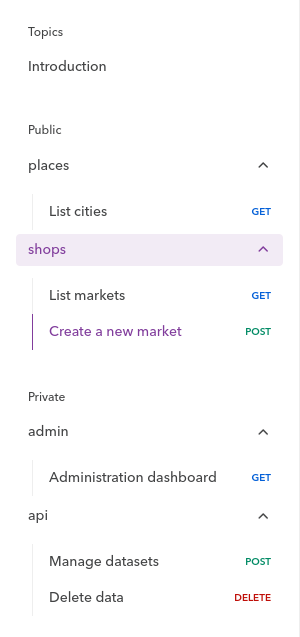
This is done with the following x-tagGroups array in your API definition:
x-tagGroups:
  - name: "Public"
    tags: ["places", "shops"]
  - name: "Private"
    tags: ["admin", "api"]
tags:
  - name: "places"
  - name: "shops"
  - name: "admin"
  - name: "workspace"
paths:
  /geo/cities:
    get:
      tags: ["places"]
      ...
  /amenities/market:
    get: # Operation Object
      tags: ["shops"]
      ...
    post: # Operation Object
      tags: ["shops"]
      ...
  /dashboard:
    get:
      tags: ["admin"]
      ...
  /api/v1/manage:
    post:
      tags: ["api"]
      ...
  /api/v1/purge:
    delete:
      tags: ["api"]
      ...